
Creating a Drupal 7 module from scratch
Drupal’s API (Application Programmer Interface) provides the golden combination of simplicity and power. Almost every phase of Drupal’s page building process can be intercepted and the data modified. But powerful modules can still be written in just a few dozen lines of code.
Now, we are going to create a simple tutorial drupal 7 module from scratch …
Building your module’s basic structure
Let’s start by creating the basic folder structure and files for our module. A Drupal module needs to be placed in a specific directory in your Drupal installation and it needs to have some basic files so that it can be identified as a module by the Drupal system. The first thing we need to do is create a folder for our module called myblock. That folder should be kept in the sites\all\modules\ folder of your Drupal installation. In this folder create two blank files called myblock.infomyblock.module
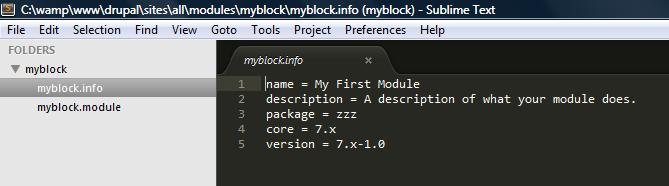
This basically describes your module’s basic properties like its name, description and on which Drupal core level it can be deployed. Once you have added these details to the myblock

Understanding Drupal Hooks
The system to extend Drupal is built completely on the concept of hooks. Hooks are based on naming. For a module to implement a hook in Drupal, it has to create a function called modulename_hookname depending on which hook it needs to implement in the .module file. Once there is an event to call the hooks, the Drupal system will call the hook implementation of all the enabled modules.
The first hook we will implement in our basic module is the hook_block_info and hook_block_view which lets you view a block in any region you wish on your theme.
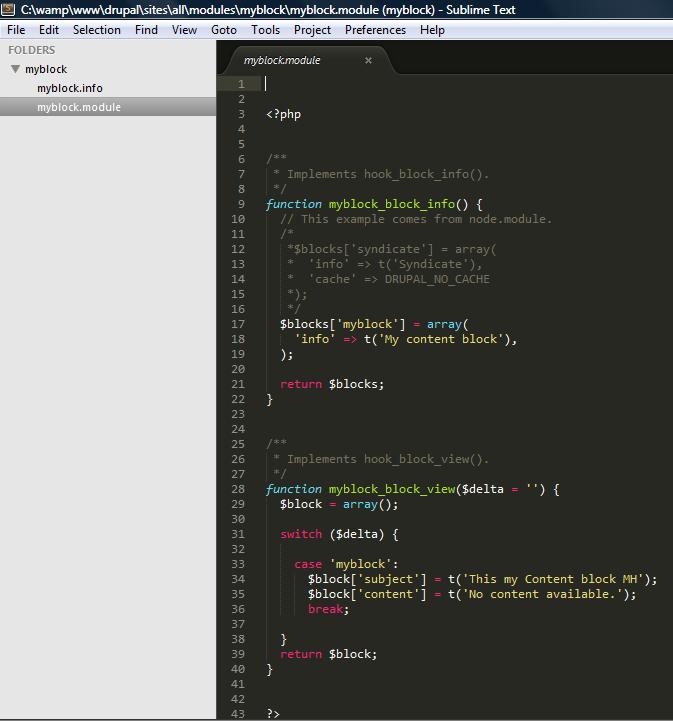
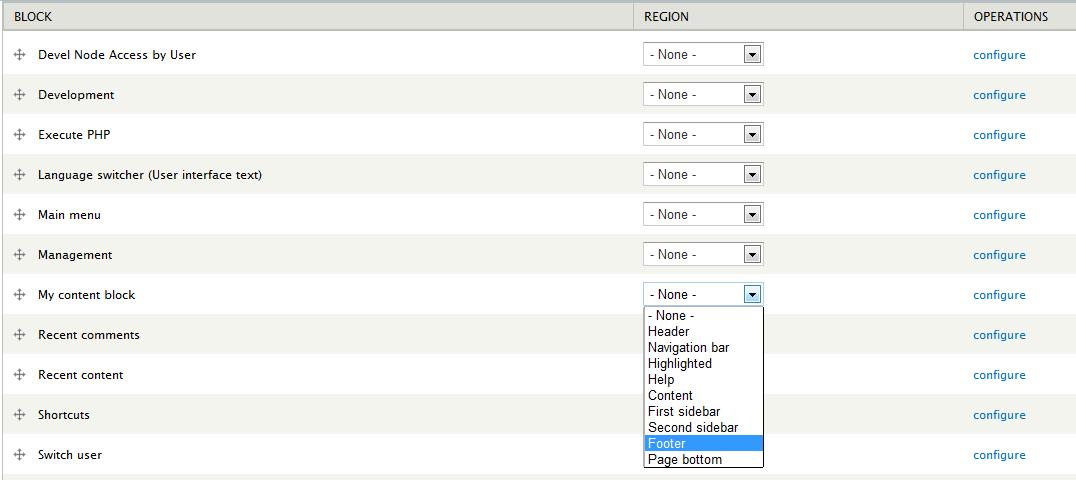
The hook myblock_block_info will display in structure my block and we can affect it to display in the footer for example :
This will display via myblock_view the following :

Conclusion
In this article we created a complete Drupal module from scratch. We used different Drupal hooks and Drupal functions to create a configuration page and to create a block which we can place on a region. Drupal provides a variety of hooks which can be used to customize and provide additional functionality over the core. Through this short and fun tutorial, we’ve proven the extensible nature of Drupal makes expanding on it an easy and pleasant task. this tutorial will be continued here



