
Ubuntu Linux Backup MySQL Server Shell Script
You can use mysqldump command to backup database. The mysqldump client is a backup program. It can be used to dump a database or a collection of databases for backup or for transferring the data to another SQL server. The dump contains SQL statements to create the table or populate it, or both.
Once database is dumped, you need to upload the same to ftp server. Use lftp client to upload all files.
Install lftp
lftp is a file transfer program that allows sophisticated ftp, http and other connections to other hosts. If site is specified then lftp will connect to that site otherwise a connection has to be established with the open command. To install lftp, enter:
sudo apt-get install lftp
Shell script to backup MySQL database server
Following is the shell script. It will dump all database to /backup/mysql and later it will upload to FTP server. You need to setup correct username and password before using the script:
#!/bin/bash
#
## go to folder where to backup
#
cd /root/scripts/backups/

for i in mon_site mon_forum mon_blog; do

## Save mysql databases in .sql files
mysqldump -uroot -pmonpass $i > ${i}_`date +"%Y-%m-%d"`.sql

## Compression with tar.bz2 (best rate compression)
tar jcf ${i}_`date +"%Y-%m-%d"`.sql.tar.bz2 ${i}_`date +"%Y-%m-%d"`.sql

## delete unzipped exports
rm ${i}_`date +"%Y-%m-%d"`.sql
done
lftp -u $FTPU,$FTPP -e "mkdir /mysql/;cd /mysql/; mput /root/scripts/backups/*; quit" $FTPS
Save script as /home/your-name/backup_bdd.sh file. Setup executable permission:
$ chmod +x /home/your-name/backup_bdd.sh
To backup MySQL, enter:
/home/your-name/backup_bdd.sh
OR
sudo /home/your-name/backup_bdd.sh
Clean older files :
To clean old sql files we create a bash/script file clean_backups.sh :
#!/bin/bash
#
## Delete Files older than 5 days
#
find /root/scripts/backups/ -type f -mtime +4 -delete
Run MySQL backup script as cron job
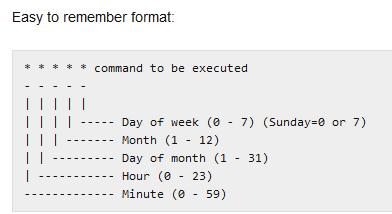

To automate procedure setup a cron job. For example run backup everyday at midnight (i.e once a day), enter:
$ sudo crontab -e
Append following cron job (will open with nano):
@midnight /home/you/backup_bdd.sh >/dev/null 2>&1
# run five minutes after midnight, every day
   5 0 * * *       /home/you/clean_backups.sh >/dev/null 2>&1
Save and close the file. Please note that above script should work with other Linux distros or UNIX like oses.
What is /dev/null 2>&1?
This is the way to execute a program quietly, and hide all its output.
/dev/null is a special filesystem object that throws away everything written into it. Redirecting a stream into it means hiding an output.
The 2>&1 part means “redirect both the output and the error streams”. Even if your program writes to stderr, that output will not be shown.
Cheers



