Install Solr 4.9 Jetty 9 and Drupal Search API on Ubuntu
How to Deploy Solr 4.3 On Jetty 9
https://www.digitalocean.com/community/tutorials/how-to-install-solr-on-ubuntu-14-04
http://hollysydney.com/article/solr-4-jetty-9-and-search-api-ubuntu
http://pietervogelaar.nl/ubuntu-12-04-install-solr-4-with-jetty-9
http://zetcode.com/java/jetty/install/
1- Install openjdk
Jetty 9 requires JDK 7, so if you don’t have it installed, install it first. In Ubuntu, it is very convenient to install openjdk using apt-get. For this section, we will be using Jetty instead of Tomcat. If you want a simple installation, execute the following command :
apt-get install -y openjdk-7-jdkmkdir -p /usr/javaln -s /usr/lib/jvm/java-7-openjdk-amd64 /usr/java/defaultNote : How to know that Java is installed in a Linux system?
In your terminal type java -version or just javac if it returns something, then you’ve java installed. Otherwise, there is also the possibility that the path variables do not contain the java path. So use locate jdk or locate java to see if you have the java binary. Don’t forget to run updatedb if you are using locate for the first time.
In case an old version is installed we must do the following before getting jetty9 or tomcat 7
$ sudo apt-get purge oracle-java6-installer
$ sudo apt-get install software-properties-common python-software-properties
$ sudo add-apt-repository ppa:webupd8team/java
$ sudo apt-get update
$ sudo apt-get install oracle-java7-installer
$ sudo apt-get install tomcat7 tomcat7-admin
2- Install Jetty 9
Get Jetty 9: http://eclipse.org/downloads/
Extract the tarball of Jetty 9 to a preferred directory, e.g. /opt. Then set $JETTY_HOME, create a new user called “jetty” and make it the owner of $JETTY_HOME.
tar -zxvf jetty-distribution-9.2.6.v20141205.tar.gz -C /optmv /opt/jetty-distribution-9.2.6.v20141205/ /opt/jetty/useradd jetty -U -s /bin/falsechown -R jetty:jetty /opt/jettyNote : If you want to change the port Jetty runs on, edit start.ini in $JETTY_HOME and change jetty.port
sudo nano /opt/jetty/start.ini
…
#=============
# HTTP Connector
#———————–
jetty.port=9090
http.timeout=30000
etc/jetty-http.xml
…
3- Install Solr package and test it
We can now start the real installation of Solr. First, download all files and uncompress them:
cd /opt
wget http://archive.apache.org/dist/lucene/solr/4.9.1/solr-4.9.1.tgz
tar -zxvf solr-4.9.1.tgz
Make a quick test to see if it works …
cp -R solr-4.9.1/example /opt/solr
cd /opt/solr/example
java -jar start.jar
Check if it works by visiting http://YOUR_IP:8983/solr. When it works, go back into your SSH session and close the window with Ctrl+C to stop java. Now we will make it work without java-jar start.jar
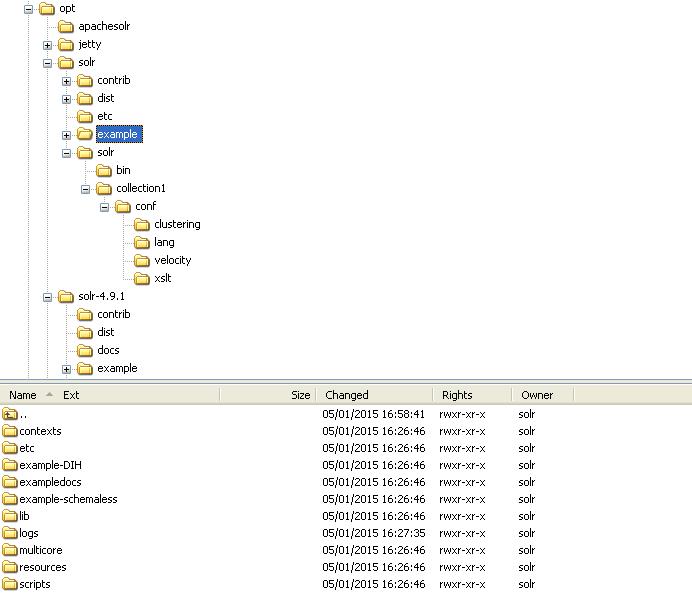
Make a place for Solr
# mkdir /opt/solr
Copy the Solr config into place
# cp -a solr-4.9.1/example/solr /opt/solr
# cp -a solr-4.9.1/dist/ /opt/solr
# cp -a solr-4.9.1/contrib/ /opt/solr
Make a place for logs
# mkdir /opt/solr/logs
Everything is owned by Solr:
Create the Solr user and grant it permissions:
sudo useradd -d /opt/solr -s /sbin/false solr
sudo chown solr:solr -R /opt/solr
4-Configure Jetty for SolR :
a- Create the settings file of jetty in /etc/default :
sudo nano /etc/default/jetty
and paste following in it.
NO_START=0 # Start on boot
JAVA_OPTIONS="-Dsolr.solr.home=/opt/solr/solr $JAVA_OPTIONS"
JAVA_HOME=/usr/java/default
JETTY_HOME=/opt/jetty
JETTY_USER=solr
JETTY_LOGS=/opt/solr/logs
Save it.
b- Copy script jetty.sh to /etc/init.d/ to make it run as a service.
cp -a /opt/jetty/bin/jetty.sh /etc/init.d/jetty (which come with the jetty package install)
or
sudo wget -O /etc/init.d/jetty http://dev.eclipse.org/svnroot/rt/org.eclipse.jetty/jetty/trunk/jetty-distribution/src/main/resources/bin/jetty.sh
sudo chmod a+x /etc/init.d/jetty
sudo update-rc.d jetty defaults
c- Create log for jetty under SolR
open the file /opt/solr/etc/jetty-logging.xml (nano /opt/solr/etc/jetty-logging.xml) and paste this into it:
<?xml version="1.0"?>
  <!DOCTYPE Configure PUBLIC "-//Mort Bay Consulting//DTD Configure//EN" "http://jetty.mortbay.org/configure.dtd">
  <!-- =============================================================== -->
  <!-- Configure stderr and stdout to a Jetty rollover log file -->
  <!-- this configuration file should be used in combination with -->
  <!-- other configuration files.  e.g. -->
  <!--    java -jar start.jar etc/jetty-logging.xml etc/jetty.xml -->
  <!-- =============================================================== -->
  <Configure id="Server">

      <New id="ServerLog">
        <Arg>
          <New>
            <Arg><SystemProperty name="jetty.logs" default="."/>/yyyy_mm_dd.stderrout.log</Arg>
            <Arg type="boolean">false</Arg>
            <Arg type="int">90</Arg>
            <Arg><Call name="getTimeZone"><Arg>GMT</Arg></Call></Arg>
            <Get id="ServerLogName" name="datedFilename"/>
          </New>
        </Arg>
      </New>

      <Call name="info"><Arg>Redirecting stderr/stdout to <Ref id="ServerLogName"/></Arg></Call>
      <Call name="setErr"><Arg><Ref id="ServerLog"/></Arg></Call>
      <Call name="setOut"><Arg><Ref id="ServerLog"/></Arg></Call></Configure>
Then, grant it permissions again under solr user :
sudo chown solr:solr -R /opt/solr
Now start Jetty as a service.
service jetty start
Once it prompts “Starting Jetty: OK”, you can visit http://localhost:8080/ to see the welcome page of Jetty 9.
cp -a solr-4.9.1/dist/solr-4.9.1cp -a solr-4.9.1cp -a solr-4.9.1/example/lib/ext/* /opt/jetty/lib/ext/1tar zxvf solr-4.3.0-src.tgz -C /tmpCopy the .war package to webapps directory of $JETTY_HOME, copy solr directory in the example/ directory to a preferred directory as $SOLR_HOME, e.g /opt. dist/ and contrib/ are also necessary.
cp -a solr-4.3.0/dist/solr-4.3.0.war /opt/jetty/webapps/solr.war
cp -a solr-4.3.0/example/solr /opt/solr
cp -a solr-4.3.0/dist /opt/solr
cp -a solr-4.3.0/contrib /opt/solr
Also, you will need the context and some modules to have Solr run properly on Jetty.
cp -a solr-4.3.0/example/contexts/solr-jetty-context.xml /opt/jetty/webapps/solr.xml
cp -a solr-4.3.0/example/lib/ext/* /opt/jetty/lib/ext/
Add a line to the settings file of Jetty
echo JAVA_OPTIONS=”-Dsolr.solr.home=/opt/solr $JAVA_OPTIONS” >> /etc/
Solr is now one directory closer to Jetty than the default configuration shipped with Solr
# sudo nano solr/solr/collection1/conf/solrconfig.xml
<!-- modify the path as following as we are a directory closer now -->
...
<lib dir="../../contrib/extraction/lib" regex=".*\.jar" />
<lib dir="../../dist/" regex="solr-cell-\d.*\.jar" />

<lib dir="../../contrib/clustering/lib/" regex=".*\.jar" />
<lib dir="../../dist/" regex="solr-clustering-\d.*\.jar" />

<lib dir="../../contrib/langid/lib/" regex=".*\.jar" />
<lib dir="../../dist/" regex="solr-langid-\d.*\.jar" />

<lib dir="../../contrib/velocity/lib" regex=".*\.jar" />
<lib dir="../../dist/" regex="solr-velocity-\d.*\.jar" />
...

<!--  <lib dir="/non/existent/dir/yields/warning" /> -->