
Jquery / AJAX Database Sample Calls to mysql
This is more of personnal notes/code braindump to remember how to do. I will expose you two methods for using javascript calls via DOM and Ajax/Jquery to process mysql queries …
Before starting, I like to recall how Jquery works :

Create an example.php document prepare a bloc div like :
<div id=”avatarsavediv”></div>
The XMLHttpRequest Object
All modern browsers support the XMLHttpRequest object (IE5 and IE6 use an ActiveXObject).
The XMLHttpRequest object is used to exchange data with a server behind the scenes. This means that it is possible to update parts of a web page, without reloading the whole page.
Example.php (JavaScript part)
<script type="text/javascript">
function showUser(str)
{
if (str=="")
  {
  document.getElementById("avatarsavediv").innerHTML="";
  return;
  }
if (window.XMLHttpRequest)
  {// code for IE7+, Firefox, Chrome, Opera, Safari
  xmlhttp=new XMLHttpRequest();
  }
else
  {// code for IE6, IE5
  xmlhttp=new ActiveXObject("Microsoft.XMLHTTP");
  }
xmlhttp.onreadystatechange=function()
  {
  if (xmlhttp.readyState==4 && xmlhttp.status==200)
    {
    document.getElementById("avatarsavediv").innerHTML=xmlhttp.responseText;
    }
  }
// best to set a new variable name so I don't forget what I'm working on
var avatarid = str;
// below we can grab a mysql value if we need to
var phpnickname = "<?= $username ?>";
var avurl = "function.php?nickname="+phpnickname+"&avatarid="+avatarid;
xmlhttp.open("GET",avurl,true);
xmlhttp.send();
}
</script>
See a complete Original source of code above :
http://www.w3schools.com/php/php_ajax_database.asp
http://www.w3schools.com/ajax/ajax_xmlhttprequest_send.asp / Async=true
AJAX way doing
Another way will be to use the ajax build on jquery (more easy than dom language with all tests for browsers like above :
In your example.php there is a like that (see screenshot joined) :
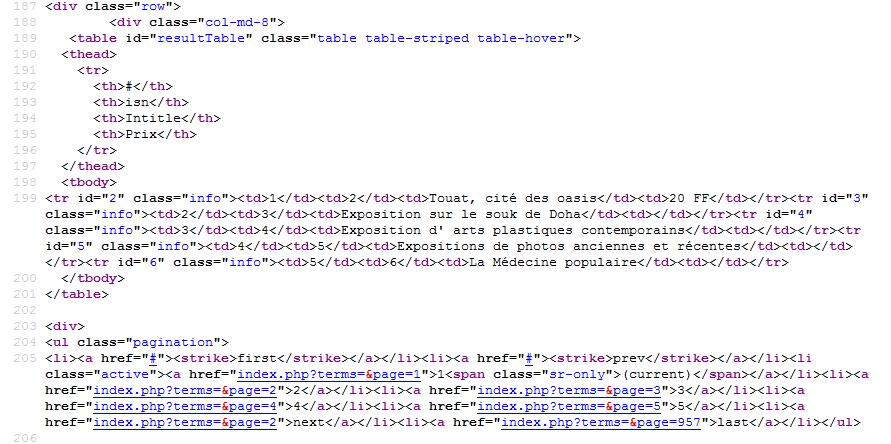
In this sample we click on a row table which will fire jquery event with a post ajax call with id value to process.php and print result in :
<div id=”tags”></div>
</head>
 <script src="js/jquery-1.9.1.min.js"></script>
  <script>
		$(document).ready(function () {
     $('#resultTable tr').click(function (event) {
          //alert(this.id); //trying to alert id of the clicked row

$.ajax({
       url : 'process.php',
       type : 'POST', // Le type de la requête HTTP, ici devenu POST
       data : 'visn=' + this.id, // we pass our variables, via POST, to our script process.php
       dataType : 'html',
       success : function(code_html, statut){
           $('#tags').empty(); // we empty the tags div
           $('#tags').append(code_html); // we pass code_html to jQuery() to fill the div again
       },

       error : function(resultat, statut, erreur){

       },

       complete : function(resultat, statut){

       }

    }); //End ajax  Call

    });
Note : jQuery: $(document).ready and $(window).load
$(document).ready(function(){
//code
});
Specify a function to execute when the DOM is fully loaded.
$(window).load(function(){
//code
});
Specify a function when the page is fully loaded including graphics.



